Making Private Maven Packages Work on GitHub
Publishing private Java libraries to GitHub Packages sounds simple until everything is private. Default repo tokens help in a few places, but a clean setup needs a Personal Access Token, a couple of small Maven tweaks, and two short GitHub Actions workflows. Here is the end‑to‑end recipe that has been reliable across multiple repositories without extra infrastructure.
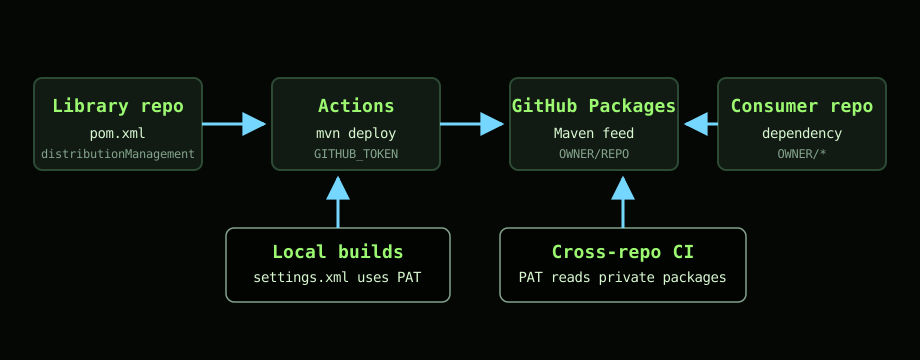
1) Create a Personal Access Token
You will need a GitHub Personal Access Token (PAT) with the following scopes:
repo(for private repositories)write:packagesread:packages
Create it under Settings → Developer settings → Personal access tokens. Copy it once and store it as an organization secret if possible, so multiple repos can use the same credentials safely. Name suggestions:
MVN_USER→ your GitHub usernameMVN_TOKEN→ the PAT you just created
2) Tell Maven where to publish
In your library’s pom.xml, point distributionManagement at the package feed for the repository that will own the package:
<distributionManagement>
  <repository>
    <id>github</id>
    <name>GitHub Packages</name>
    <url>https://maven.pkg.github.com/OWNER/REPO</url>
  </repository>
</distributionManagement>
Replace OWNER with your user or org, and REPO with the repository that hosts the package. The <id> value must match the server id you will define in settings.xml.
3) Configure settings.xml
Run mvn -X to see which settings.xml Maven is using. Add a server and a profile. The server id must match the one in distributionManagement.
<settings>
  <servers>
    <server>
      <id>github</id>
      <username>${env.MVN_USER}</username>
      <password>${env.MVN_TOKEN}</password>
    </server>
  </servers>

  <profiles>
    <profile>
      <id>github</id>
      <repositories>
        <repository>
          <id>github</id>
          <url>https://maven.pkg.github.com/OWNER/*</url>
          <snapshots><enabled>true</enabled></snapshots>
        </repository>
        <repository>
          <id>central</id>
          <url>https://repo1.maven.org/maven2</url>
        </repository>
      </repositories>
    </profile>
  </profiles>

  <activeProfiles>
    <activeProfile>github</activeProfile>
  </activeProfiles>
</settings>
Notes:
- The
OWNER/*wildcard lets Maven resolve packages from any repository under that owner. This avoids hard‑coding a single repo per dependency. - Using
${env.MVN_USER}and${env.MVN_TOKEN}keeps secrets out of files; the CI job will provide them via environment variables.
4) Dry‑run a local deploy
From the library project, run:
mvn -B -DskipTests deploy
If you see a 401 Unauthorized, check scopes on the PAT and that the server id matches distributionManagement. If you see a conflict, bump the version before redeploying.
5) Publish automatically with GitHub Actions
Add a workflow to the library repository to publish on every push to main (or on tagged releases if you prefer). This uses the built‑in GITHUB_TOKEN for publishing to the current repo’s package feed, plus a self‑contained settings.xml written by actions/setup-java.
name: Build and Deploy Package

on:
  push:
    branches: [ main ]

jobs:
  build:
    runs-on: ubuntu-latest
    permissions:
      contents: read
      packages: write

    steps:
      - uses: actions/checkout@v4

      - name: Set up JDK 17
        uses: actions/setup-java@v4
        with:
          java-version: '17'
          distribution: 'temurin'
          server-id: github
          cache: 'maven'
          settings-path: ${{ github.workspace }}

      - name: Publish to GitHub Packages
        run: mvn -B -DskipTests deploy -s $GITHUB_WORKSPACE/settings.xml
        env:
          GITHUB_TOKEN: ${{ secrets.GITHUB_TOKEN }}
Why this works: the workflow publishes to the same repo that hosts the workflow, which GitHub allows using GITHUB_TOKEN. No PAT needed here.
6) Consume the package in another private project
In the consumer project’s pom.xml, point repositories at the owner’s feed and add the dependency:
<repositories>
  <repository>
    <id>github</id>
    <name>GitHub Packages</name>
    <url>https://maven.pkg.github.com/OWNER/*</url>
  </repository>
</repositories>

<dependency>
  <groupId>com.example</groupId>
  <artifactId>my-package</artifactId>
  <version>1.0.0</version>
</dependency>
For local builds, re‑use the same settings.xml pattern from step 3 so Maven can authenticate with your PAT.
7) Build consumers in CI with a PAT
When a different repository needs to download your private package inside GitHub Actions, the default token usually is not enough. Use your org secrets instead:
name: Build Consumer

on: [ push, pull_request ]

jobs:
  build:
    runs-on: ubuntu-latest
    permissions:
      contents: read
      packages: read

    steps:
      - uses: actions/checkout@v4

      - name: Set up JDK 17
        uses: actions/setup-java@v4
        with:
          java-version: '17'
          distribution: 'temurin'
          cache: 'maven'
          server-id: github
          server-username: MVN_USER
          server-password: MVN_TOKEN

      - name: Build with Maven
        run: mvn -B clean verify -Pgithub
        env:
          MVN_USER: ${{ secrets.MVN_USER }}
          MVN_TOKEN: ${{ secrets.MVN_TOKEN }}
This injects credentials into the generated settings.xml, allowing Maven to fetch your private packages during the build.
8) Common pitfalls to avoid
- Wrong owner or repo in URLs.
https://maven.pkg.github.com/OWNER/REPOfor deploys,https://maven.pkg.github.com/OWNER/*for resolving across many repos. - Server id mismatch. The
<id>indistributionManagementmust equal the<server><id>insettings.xml. - Missing scopes. Use
repo,write:packages, andread:packageson the PAT. - Publishing snapshots vs releases. Keep versions moving; GitHub will reject overwrites. Use
-SNAPSHOTduring development. - GroupId drift. Consumers must declare the exact
groupIdandartifactIdthat you publish. - Using org name as username. Authentication uses your personal GitHub username, not the organization name.
- Caching confusion. If a build pulls the wrong version, clear the Maven cache on the runner or bump the version to force a refresh.
That is the complete loop: one PAT for cross‑repo reads, a safe settings.xml pattern, and two small workflows that publish and consume packages without extra servers. It is simple, repeatable, and friendly to private repositories.
Thanks for reading. If you have a leaner pattern for consumer CI without a PAT, share it so others can benefit.