Docker Images in GitHub Packages (Private Repos)
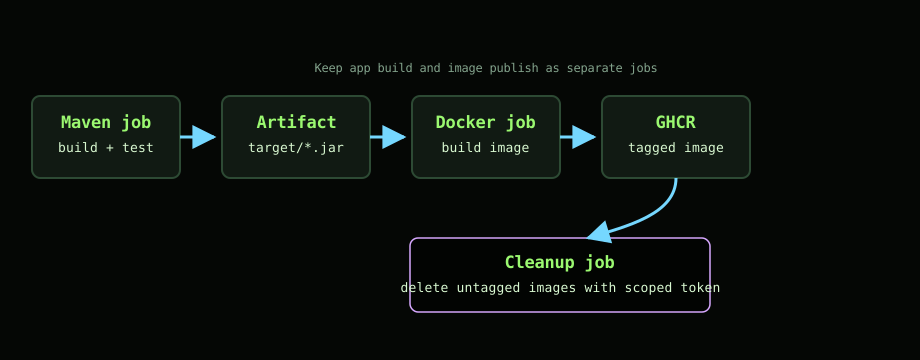
Getting private Maven packages working is useful, but most services deploy as containers. The next step is to package the application as a Docker image and publish it to GitHub Container Registry (GHCR), then keep costs sane by cleaning up what is left behind. This is a minimal, repeatable setup that builds a Spring Boot jar, turns it into an image, pushes it to GHCR, and removes untagged images so storage does not creep up over time.
For background, see the earlier posts on publishing Maven packages and Dependabot for private packages. This post focuses on containers only.
Dockerfile
Nothing fancy is needed for a Spring Boot service. A slim Java base, copy the built jar, and run it on start.
FROM openjdk:17-jdk-slim
ARG JAR_FILE=target/*.jar
COPY ${JAR_FILE} app.jar
ENTRYPOINT ["java","-jar","/app.jar"]
This same Dockerfile should work locally and in CI as long as the jar lands in target/ before the image build step.
Workflow structure
The workflow builds the jar first, stores it as an artifact, then downloads it in a second job that builds and publishes the container. Keeping the build separate from the image step makes it easy to reuse the same build process for pull requests without producing images on every branch.
Shared environment
Use the repository name as the image name and publish to GHCR.
env:
  REGISTRY: ghcr.io
  IMAGE_NAME: ${{ github.repository }}
Build the jar and upload it
Build with Maven and upload the resulting jar. This mirrors local development and keeps the Dockerfile simple.
- name: Build and Test with Maven
  run: mvn -B -Pgithub install --file pom.xml
  env:
    GITHUB_USER_REF: ${{ secrets.MVN_USER }}
    GITHUB_TOKEN_REF: ${{ secrets.MVN_KEY }}

- name: Upload build artifacts
  uses: actions/upload-artifact@v4
  with:
    name: app-jars
    path: target/*.jar
Download, build, and push the image
Download the jar to target/ so the Dockerfile can find it, then log in to GHCR, generate tags and labels, and push.
- name: Download build artifacts
  uses: actions/download-artifact@v4
  with:
    name: app-jars
    path: target

- name: Log in to the Container registry
  uses: docker/login-action@v3
  with:
    registry: ${{ env.REGISTRY }}
    username: ${{ github.actor }}
    password: ${{ secrets.GITHUB_TOKEN }}

- name: Extract metadata (tags, labels) for Docker
  id: meta
  uses: docker/metadata-action@v5
  with:
    images: ${{ env.REGISTRY }}/${{ env.IMAGE_NAME }}

- name: Build and push Docker image
  id: push
  uses: docker/build-push-action@v6
  with:
    context: .
    push: true
    tags: ${{ steps.meta.outputs.tags }}
    labels: ${{ steps.meta.outputs.labels }}
Permissions: the job needs packages: write to push, plus attestations: write and id-token: write if you enable provenance later. Add these at the job level:
permissions:
  contents: read
  packages: write
  attestations: write
  id-token: write
The docker/metadata-action uses sensible defaults. By default it tags images with the branch and commit. When a branch tag is reused, GHCR moves the tag to the latest image but keeps the older images untagged.
Keep storage under control
Untagged images accumulate after each push. To avoid paying for storage overages, add a cleanup job that removes untagged images for this repository after a successful push.
remove-package-versions:
  needs: push
  name: Remove Untagged Docker Images
  runs-on: ubuntu-latest
  steps:
    - name: Checkout repository
      uses: actions/checkout@v4

    - name: Get repository name
      id: repo-name
      uses: MariachiBear/get-repo-name-action@v1.1.0
      with:
        string-case: 'lowercase'

    - name: Purge untagged containers
      uses: dylanratcliffe/delete-untagged-containers@main
      with:
        package_name: ${{ steps.repo-name.outputs.repository-name }}
        token: ${{ secrets.MVN_KEY }}
Use a Personal Access Token for the deletion step if required by the action you choose. For package deletion, that token should include delete:packages, plus the read or write package scopes required by the cleanup action. Do not assume the same token used for Maven publishing is enough unless it has the deletion scope too.
Troubleshooting checklist
- Push denied: confirm job permissions include
packages: write. - No jar in image build: verify the download step writes to
target/so the Dockerfile’sARG JAR_FILE=target/*.jarcan find it. - Wrong image name: check
IMAGE_NAMEis set to${{ github.repository }}and thatREGISTRYisghcr.io. - Storage climbing: confirm the cleanup job runs after pushes and that the PAT has permission to delete untagged images.
- Local dev parity: run
mvn -B -Pgithub installlocally, thendocker build -t test .to confirm the Dockerfile works outside CI.
That is the entire loop. Build the jar once, reuse it for the container image, publish to GHCR with the built in GITHUB_TOKEN, and prune what you do not need. The result is predictable, cheap to run, and easy to copy across repositories.
Thanks for reading. If you have a leaner cleanup approach or a tagging convention that scales for multi environment deploys, share it so others can benefit.