Homelab Journey Part 7: Backups with Restic That I Actually Trust
I do not trust a backup because a job says it completed.
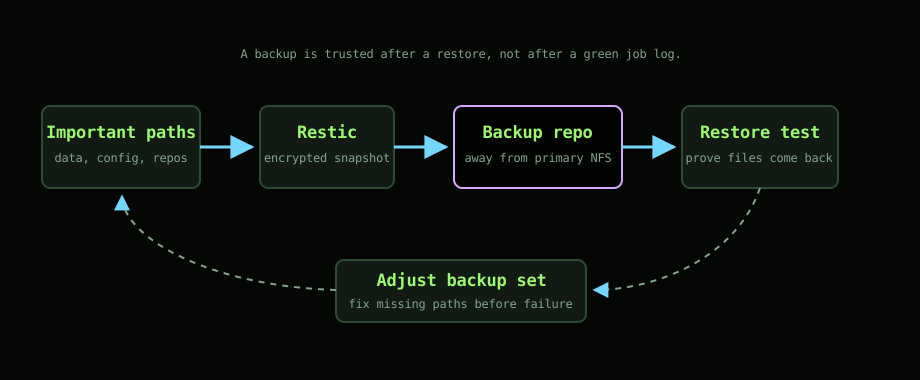
I trust it when I have restored from it.
That is the difference that changed how I think about backups in the homelab. A green log line is nice. It is not proof that the thing you care about can come back.
Restic is the tool I use because it keeps the setup simple. It is encrypted, deduplicated, scriptable, and portable. More importantly, I can understand the recovery process without needing the exact original machine to still exist.
NFS is not a backup
Most of the important state in my homelab lives on shared storage.
That makes service deployment easier. Containers can move around the Swarm and still find their data. It keeps writes off SD cards. It gives the cluster one obvious place for persistent state.
It also creates an obvious risk.
If the storage node has a bad day, the lab has a bad day. NFS makes storage convenient. It does not make it safe. Replication would not be enough either, because accidentally deleting the wrong directory would happily replicate the mistake.
Backups need to be separate from the thing they are protecting.
What I back up
The backup set is focused on things that would be painful or impossible to recreate.
That means service data, configuration, secrets where appropriate, documents, photos metadata, Home Assistant config, Gitea repositories, and the parts of the homelab repo that describe how everything is deployed.
I do not care about backing up caches, generated thumbnails, temporary files, or anything that can be rebuilt easily. Backing up everything sounds safer, but it usually makes restores noisier and storage costs creep up.
The question I ask is:
If this vanished tonight, would I need it back?
If yes, it goes in the backup set. If no, it probably does not.
Why Restic fits
Restic is boring in the right way.
It runs from a single binary. It can target local storage or S3-compatible storage. It encrypts before data leaves the machine. It stores snapshots, so I can go back to a specific point in time. It deduplicates, so repeated backups do not mean repeated full copies.
That matches the homelab well. I do not need a big backup platform. I need a repeatable command, a clear retention policy, and a restore process I have actually tested.
The restore test
The restore test is the part that makes the backup real.
Every so often I restore something small into a temporary directory. A Home Assistant file. A document. A service config. Something I can inspect.
That test answers questions a log cannot:
- do the credentials still work?
- do I know the password?
- can the machine reach the repository?
- did I include the right paths?
- is the restored file actually usable?
The first time you learn a path was missing should not be during an actual failure.
Retention without hoarding
Restic will keep snapshots forever unless you tell it not to.
Forever sounds comforting until the repository grows for no good reason. I prefer a simple retention window: recent daily snapshots, a handful of weekly ones, and longer monthly points for the data that deserves it.
Different data can have different value. Some service config only needs a short window. Photos and documents deserve more care. The policy should match the consequence of loss, not a generic rule copied from a tutorial.
Alerts matter less than restores
I still want backup jobs to report failure. Silent failures are dangerous.
But alerts are not enough. A backup system can alert perfectly and still be useless if the wrong paths are selected or the restore process is unclear. So I treat alerts as one layer, not the whole answer.
The hierarchy is:
- know what matters
- back up the right paths
- keep copies away from the primary storage
- test restores
- then worry about nicer reporting
That order keeps me honest.
Why I trust it now
I trust the setup because it is small enough to understand and because I have practised the uncomfortable bit: getting data back.
There is still room to improve it. There always is. Better reporting, better documentation, and more regular restore drills would all help. But the foundation is there.
The important data is not only sitting on the Pi cluster hoping nothing goes wrong. It has somewhere else to be, and I know how to bring it back.
That is what a backup is for.