Homelab Journey Part 4: Networking with Traefik and Dynamic DNS
Networking is where a homelab can get messy very quickly.
The easy version is simple: run a service, open a port, hope nothing embarrassing happens. The overbuilt version is also easy to find: tunnels, split DNS, VLANs, service meshes, multiple ingress layers, and a diagram that looks more serious than the problem.
I wanted something in the middle.
My goal was to make a few services reachable by name, keep most things private, and avoid managing certificates by hand. That is it. The lab does not need to look like a cloud platform. It needs to be understandable when something stops loading.
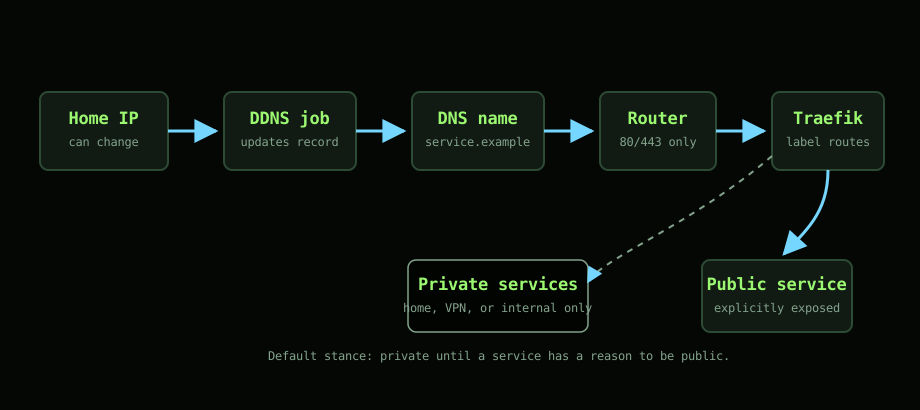
What Traefik does for me
Traefik sits at the front of the Swarm and routes traffic to the right service.
Each service gets labels in its stack file. Those labels tell Traefik which hostname to listen for, which internal port to route to, and whether HTTPS should be used. That keeps routing close to the service definition. If I move a service or redeploy a stack, I am not hunting through a separate reverse proxy config trying to remember what changed.
For this setup, that is a big win.
Traefik also handles certificates. I do not want to SSH into the cluster to renew certs. I do not want calendar reminders for TLS. If a tool can do that safely and repeatably, it should.
Dynamic DNS is good enough
The other problem is that my home IP can change.
Dynamic DNS keeps a hostname pointed at the current public IP. When the ISP changes the address, the DNS record gets updated. It is not glamorous, but it solves the actual problem.
There are more polished ways to do this. There are also more complicated ones. For a home setup, dynamic DNS is fine. The important part is not the mechanism. The important part is that I can reach the handful of services that need to be reachable without pretending I have a static business connection.
Not everything needs to be public
This is the line I try to keep clear.
Just because Traefik can expose a service does not mean it should. Some things are useful on the public internet. Some things are only useful from home. Some things should stay behind a VPN or not be reachable remotely at all.
Dashboards are the obvious example. A dashboard feels harmless because it is “just status”, but it often leaks more than you think. Service names, versions, routes, internal structure, and sometimes buttons that do real things. I do not need that open to the world.
So the default is private. Public access has to earn its place.
The mistakes were boring
Most of the mistakes were not dramatic security failures. They were normal operational mistakes.
I requested too many certificates while testing. I exposed things that should have stayed internal. I had labels that looked right but routed to the wrong port. I forgot that DNS changes are not instant. I treated “it works from inside the house” as proof that it worked from outside.
None of that is interesting, but it is exactly the kind of thing that wastes an evening.
The fix was mostly discipline:
- keep service labels simple
- expose fewer routes
- keep the Traefik dashboard internal
- document which hostnames exist and why
- test from outside the network before calling it done
How it fits the Swarm
Traefik works well with Docker Swarm because it can discover services from labels. That means I do not have to manually edit a central config every time I deploy something.
The stack file becomes the source of truth for routing. Ansible deploys the stack. Swarm schedules the service. Traefik sees the labels and updates the route.
That is the loop I want. Small, repeatable, and easy to inspect.
It is not perfect. Labels can get noisy. YAML can still betray you. If the routing is wrong, the error can look like a service problem until you check the proxy logs. But the model is still simple enough that I can work through it without needing a whole networking afternoon.
What I would avoid
I would not start by exposing every service with a nice hostname. That feels tidy, but it creates more surface area than you need.
I would also avoid treating HTTPS as the whole security story. A certificate only means the connection is encrypted and the hostname matches. It does not mean the thing behind it should be public.
The better question is:
Does this service need to be reachable from outside the house?
Most of the time, the answer is no.
The takeaway
Traefik and dynamic DNS give me enough access without turning networking into the main project. I get clean names, automatic certificates, and a routing layer that fits Docker Swarm.
The useful part is not that everything is accessible. The useful part is that the right things are accessible, and the rest stays quiet.